• Home
  • About
  • My Company – Auri’s Ideas
  • Projects
  • Videos

Auri's Blog

Hi, my name is Auri Rahimzadeh. This is where I blog about technology and things I find interesting.
Stay updated via RSS

  • Latest Posts

    • AI In Your Every Day – New Presentation
    • Fixing “Testflight error: Couldn’t Load Apps, Testflight is currently unavailable”
    • Lessons Learned: Apple In-App Purchase Submission Checklist
    • “File Not Found” When Parsing P8/PEM File to Create JWT Token in Azure S0 Instance – But Works Locally
    • Android debugging options disappeared after updating Visual Studio?
  • Top Posts & Pages

    • How to Debug/Test AWS Lambda Functions Locally in Visual Studio, Including with DynamoDb
    • Fixing "Testflight error: Couldn't Load Apps, Testflight is currently unavailable"
    • If you’re having trouble setting the default button in an ASP.NET Panel that has a Master Page…
    • Review: Dell Tablet Wireless Keyboard + Folio Case
    • "File Not Found" When Parsing P8/PEM File to Create JWT Token in Azure S0 Instance - But Works Locally
    • Windows Phone System Architecture – Auri’s Journal
    • Follow Auri's Blog on WordPress.com

    Starbucks WiFi Auto Login for WP7 & Android

    Posted: January 24, 2011 in Clubhouse Posts (Computers, Software, and Internet)
    Tags: android, auto login, clubhouse, samsung galaxy tab, starbucks, wifi, windows phone 7
    0

    I have a Samsung Galaxy Tab. I love it. Unfortunately, Android falls way short when it comes to figuring out whether to connect through 3G or WiFi. Basically, if you’re connected to a WiFi hot spot that requires a login, Android will happily keep letting its site and service requests fail until you actually go through the process of logging in. This is especially true at Starbucks, where you have to login before connecting to the Internet. Actually, this is true of many “smart” devices.

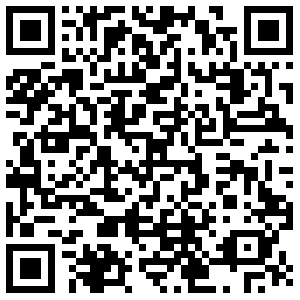
    Well, I got tired of this and just wrote an app to get around it. Enter Starbucks Wi-Fi Auto Login for both Android and Windows Phone 7. Tap and connect, it’s that simple. Search for it in the respective markets. If you have a QRCode scanner, simply scan the appropriate link below.

    image image

    Windows Phone 7

    Android

    Enjoy!

    Clubhouse Tags: clubhouse, windows phone 7, android, samsung galaxy tab, starbucks, wifi, auto login

    Share this:

    • Click to share on Facebook (Opens in new window) Facebook
    • Click to share on X (Opens in new window) X
    Like Loading...

    Related

    Leave a comment Cancel reply

    DuoChart featured on Inside Indiana Business
    Having DVD Region Playback Problems in Windows 7 Service Pack 1 (SP1)?

    Blog at WordPress.com.
    • Comment
    • Reblog
    • Subscribe Subscribed
      • Auri's Blog
      • Join 35 other subscribers
      • Already have a WordPress.com account? Log in now.
      • Auri's Blog
      • Subscribe Subscribed
      • Sign up
      • Log in
      • Copy shortlink
      • Report this content
      • View post in Reader
      • Manage subscriptions
      • Collapse this bar
    %d