Update: This bug was fixed in an update to Visual Studio 17.4.
In case your #Android #debugging options disappeared after the latest #VisualStudio updates… https://developercommunity.visualstudio.com/t/Android-Options-Gone-After-Updating-to-1/10910189
And here’s the fix to make to your project file:
Original order that broke this:
<TargetFrameworks>net9.0-maccatalyst;net9.0-ios;net9.0-android;</TargetFrameworks>

Changed order to have Android first and .net 9.0 next – otherwise unit tests break??? – and restarted VS (WHY did this make a difference??)
<TargetFrameworks>net9.0-android;net9.0;net9.0-maccatalyst;net9.0-ios;</TargetFrameworks>
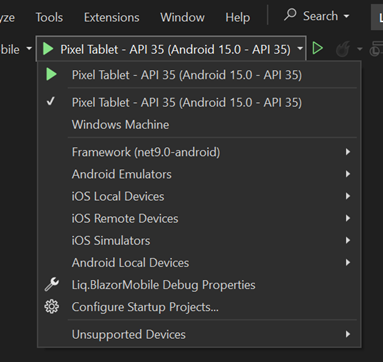
Credit to StackOverflow article: https://stackoverflow.com/questions/79626280/visual-studio-doesnt-display-the-android-emulator-run-option-after-the-update
 Auri's Blog