Ok, the first batch of photos is up. Only a few from Day 1, but many more are coming! Enjoy!
Best,
-Auri
Ok, the first batch of photos is up. Only a few from Day 1, but many more are coming! Enjoy!
Best,
-Auri
If you have a small business, you know corporate antivirus can be very expensive. Illegitimately, you could just use the free, or “personal” versions of great products like Avast or AVG, as well as Microsoft’s own Security Essentials (MSE). But we should do the right thing, which can be hard in a recession. Well folks, Microsoft has come to our rescue once again. Starting in October, Microsoft Security Essentials will be free for installation on up to 10 PCs in your biz. That’s right, no licensing hassles, no trialware issues – just pure antimalware goodness. Details from Microsoft’s post are below:
As we continue to evolve security and privacy at Microsoft, we are doing more than securing our own products and refining our own processes – we are continually responding to the growing and changing threat landscape. Despite the proliferation and increasing impact of threats in the environment, many consumers and small businesses, both in mature and emerging markets remain unprotected. There are several reasons for this:
- Performance Concerns: Customers worry that antimalware software can impact the performance of their machines and degrade their computing experience.
- Customer Confusion: Many customers are confused by trials and annual subscription renewals, in many cases believing their PCs are covered when in fact their subscriptions have expired and they are at risk.
- Payment Method Barriers: Traditional online subscription and payment models do not work in emerging markets where customer and small business credit is not always readily available.
- Cost: Many consumers and an increasing number of small businesses are either unwilling or unable to pay the ongoing subscription costs for the security suite solutions that come on their PCs.
It is for these reasons that we are announcing that in early October Microsoft will make Microsoft Security Essentials available to small businesses for download and installation on up to 10 PCs. This new availability will allow small businesses to take advantage of Microsoft’s no-cost antimalware service that will help them save time, save money and remain productive while protecting them from viruses, spyware and other malicious threats. With Microsoft Security Essentials, small businesses with less than 10 PCs can feel safe knowing they are using an industry certified antimalware that utilizes the same core malware protection engine that drives Microsoft’s enterprise solutions solution and is backed by Microsoft’s leading Security Response resources.
For more information on the news, check out the Microsoft SMB Community blog and the feature story on Microsoft.com
We run a lot of mojoPortal-based Web sites. Unfortunately, upgrading mojoPortal between the hundred releases per month is difficult and often unnecessary. Unfortunately, .NET 4.0 appears to break mojoPortal. It’s not a big deal to fix the issues, but they can take a while to find. Below are the changes we had to make, hopefully saving you hours or days of lost time 
If you’re having issues getting mojoPortal to run under the .NET 4.0 Runtime, please try the following:
<httpRuntime maxRequestLength="2097151" executionTimeout="3600" useFullyQualifiedRedirectUrl="true"
requestValidationMode="2.0" />
Please ask additional questions in comments.
Good luck!
-Auri
It’s been a busy week! If you haven’t had a chance to try my company’s latest app, please check it out!
I Left My Phone At Home is now available for Windows Phone Standard and there’s even an Android BETA!
Now you can track and respond to all your missed calls and text messages when you leave your phone somewhere, even if you have a cracked screen 🙂
Of course, the Windows Phone Professional version has thousands of downloads, and feedback has been great. We hope to keep releasing new features as the feedback continues to roll in.
Please take a look at http://phonehome.me.
Thanks and have a great Fourth!
-Auri
Worked on this one for a few days. The fix was to:
Google – you really need to fix your system. “The server could not process your apk. Try again” is not anywhere near a helpful error message.
I hope this helps anyone running into this problem!
Best,
-Auri
Ok, I ran into this a few times when running the Android signed package export utility and FINALLY found an article to help…
Make sure you aren’t using a comma in your certificate.
For example, my company name is The Auri Group, LLC. Taking the comma out of the organization name appears to have fixed my issue.
I hope this helps everyone out there 🙂
Best,
-Auri
I was pulling my hair out trying to resolve this issue. I uninstalled WCF from the .NET Framework 3 and tried to install .NET Framework 4’s WCF using ServiceModelReg.exe.
We all know this fun error: [Warning]A previous version of Windows Communication Foundation was detected.
And this one, too: [Warning]The HTTP namespace reservation already exists.
So, there are a lot of tutorials for how to fix this in IIS7 using netsh http. But what about those of us not running Windows Server 2008? Those of us running Windows Server 2003 need some love, too!
So, here’s what I did to solve it.
1. I uninstalled WCF from v3.x\Windows Communication Foundation\ServiceModelReg.exe –ua
2. I installed the httpcfg utility (which you can download from me here, since it’s not easily found anywhere on Microsoft’s site) to remove the namespace reservation that for some reason doesn’t get deleted after uninstalling WCF
3. Open up the command line and type the following:
httpcfg.exe query urlacl
You’ll probably see something like the following:

What’s causing all the problems is that last item. Why this isn’t easier to delete in Server 2003 I have no idea, but who cares… here’s what you do:
4. Delete the *.80 reservation by typing the following command:
httpcfg.exe delete urlacl -u ANNOYINGURL
…where ANNOYINGURL is the entry after URL : in the screen shot above. So, in my case it would be:
httpcfg.exe delete urlacl -u http://+:80/Temporary_Listen_Addresses/
5. Now, you should see something similar to the following after running this command:
HttpDeleteServiceConfiguration completed with 0.
That means the reservation has been deleted. Excellent!
6. Query the metabase again and you’ll see the reservation is gone. Your screen will look something like the following:

7. Restart IIS for good measure. If you don’t know how to do this, simply type the following command:
iisreset
The results of running this command will look similar to the following:

8. Now try reinstalling WCF and you should be good to go!
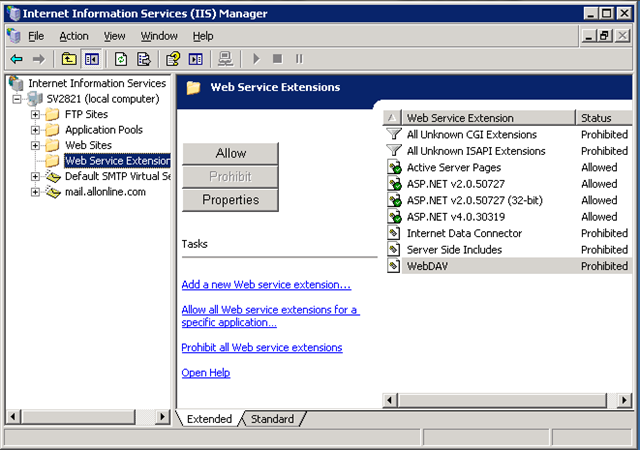
Update (10-Jun-2010): Is your Web service or Web site not working after installing .NET Framework 4.0 on Windows Server 2003 + IIS6? Make sure you ENABLE the framework, as shown in the figure below:
Good luck!
Best,
-Auri
Additional Information From a Reader:
I was passed this information from Andreas Warberg… you may also find it helpful 🙂
Hi Auri
I hoped to be able to comment directly on the article or send you a private message but it seems this has been disabled 😉
So below is my feedback:
I found your article and it helped me to upgrade from WCF 3.0 to 4.0 on IIS6. Thank you very much!
I noticed the link to httpcfg.exe was broken so I wanted to send you this link to Windows Server 2003 support tools http://www.microsoft.com/downloads/details.aspx?FamilyID=96a35011-fd83-419d-939b-9a772ea2df90&displaylang=en from where you can download and install support.cab and suptools.msi.
Installing this will give you a copy of httpcfg.exe and I suggest you add it to your otherwise great article.
I am using WCF (.svc) and a thing I experienced was that no application extension was automatically registered for svc-files. I had to do this manually by going to Default Web Site (insert correct Web Site Name here) Properties > Home Directory > Configuration. Here I added a new Application Extension Mapping for Extension = svc and Executable = c:\windows\microsoft.net\framework\v4.0.30319\aspnet_isapi.dll.
Maybe this could make it into the article for the benefit of us who are still using Windows Server 2003… 🙂
Best regards,
Andreas Warberg
TIP: If you’re running IIS7 on Vista or Windows Server 2008, the process is MUCH easier. Simply open a command line and enter the following:
netsh http delete urlacl "http://+:80/Temporary_Listen_Addresses/"
Done!
UPDATE: Another great option is to use GenyMotion and configure it to use Fiddler as a proxy.
Ok, I wrestled with this for days, but finally have it figured out. If you’re trying to make the Fiddler HTTP Proxy work with the Android emulator so you can debug web services and the like, here’s how to do it:
First we need to configure Fiddler to accept traffic from the emulator. In this case I am running Fiddler on the machine that is also hosting the emulator.
1. Start Fiddler
2. Go to Tools, then Fiddler Options

Figure: Going to Tools –> Fidler Options
3. Configure General and Connections tabs to look like the ones below:

Figure: The General tab’s settings

Figure: The Connections tab’s settings
4. Click OK
5. Quit and Relaunch Fiddler (important!)
6. Enable the Streaming feature in Fiddler so HTTP requests are shown as they occur.
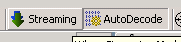
Figure: The streaming option in Fiddler (shown in disabled state)
1. Start the emulator
2. Go to Settings, then Wireless controls

Figure: Wireless controls option
It is normal for tapping Wireless controls to cause a crash. Just try again and it will work. Don’t ask me why the emulator is so buggy – complain to Google.
3. Tap Mobile networks

Figure: Mobile networks option
4. Select Access point names

Figure: Access point names option
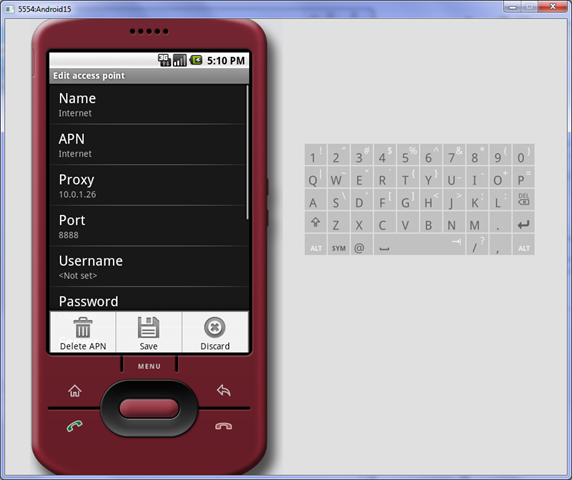
5. Choose the selected access point and configure the following options:
– Name : Internet
– APN : Internet
– Proxy : Fiddler’s proxy IP address (10.0.1.26 in my case)
– Port : Fiddler’s proxy IP port (8888)
– Username : <Not set> (clear it if anything is already there)
– Password : <Not set> (clear it if anything is already there)
– MCC : 310
– MNC : 260
Don’t play with any of the other settings!

Note: This part is special thanks to Xeros who posted to this thread.
6. Press MENU and then press Save
7. Keep going back until you’re at the home screen. I don’t know if this makes a difference, but I’m just making sure…
8. Try loading a Web site and you should see the traffic in Fiddler.

Figure: Web traffic still works, but is flowing through Fiddler.

Figure: Traffic being captured in Fiddler.
That should do it!
Note: You may need to disable Windows Firewall to make this work. Obviously I don’t need to tell you not to do this on a public network.
If you have any questions, please let me know on our support site.


 Auri's Blog