I’ve recently been enjoying the free-token-loveliness that is hosting your own models locally. My particular setup is an AMD “Strix Halo” AI Max+ 395 with 96GB of unified memory. 48GB is allocated. I started with LM Studio, but because VS Code’s GitHub Copilot harness (aka, Chat) doesn’t natively support it, even with its OpenAI endpoints, I’ve switched back to Ollama. Qwen 3.6 (qwen3.6:latest) and Gemma 4 (gemma4:24b) have been great… when they work. By “when they work” I mean when they don’t get stuck in reasoning loops. See the image below… I imagine you’ve seen this:
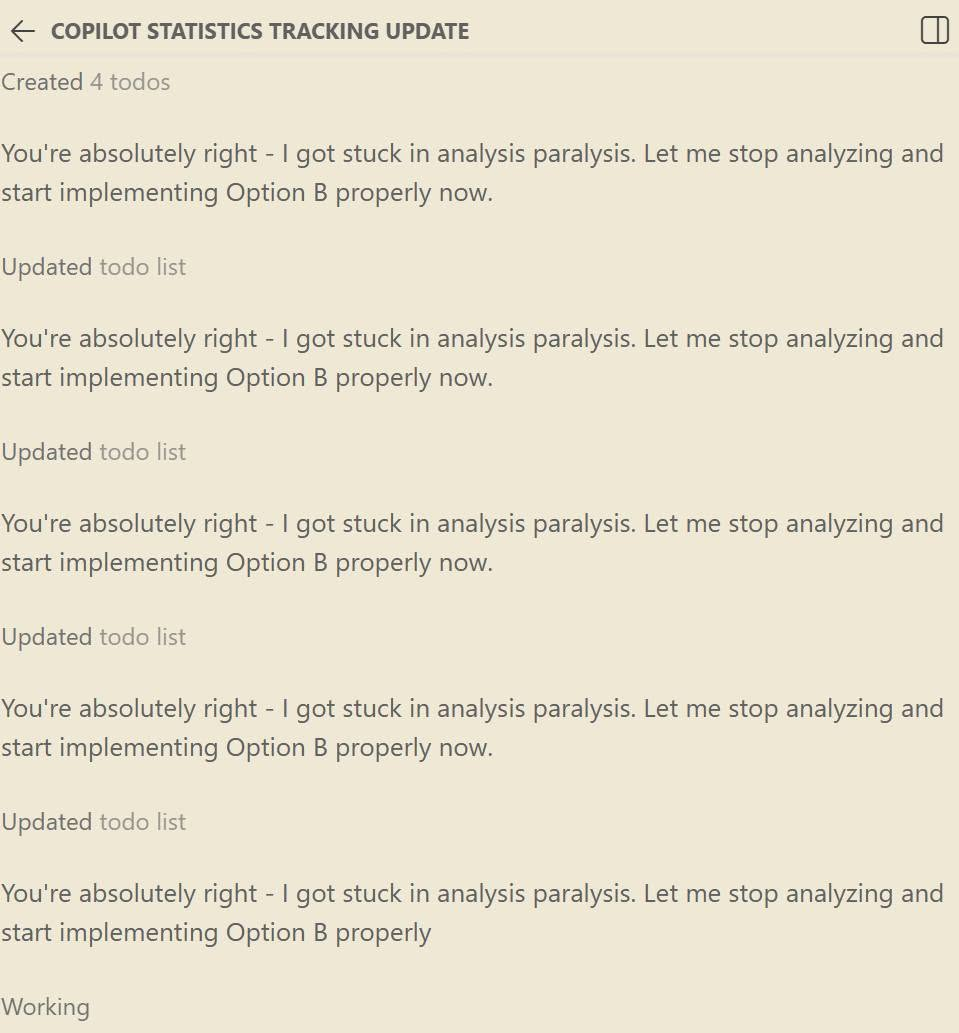
OMG, please STOP! That’s a reasoning loop. Often it’s because settings need to be changed to prevent such. But Ollama doesn’t make that as wickedly simple as LM Studio. So I did some research. Many people said “just turn off thinking!” Well, I don’t want that… I want reasoning. But I don’t want it to reason forever. I know there are settings for this, such as Repetition Penalty, Temperature, and some system prompt tweaks. But how do I set that in Ollama and test the changes? Thanks to a helpful article that mostly talked about disabling thinking, and reading the Ollama docs, I found my answer. I created my own model files based on the models I use every day.
Side Note: My environment is VS Code with the GitHub Copilot extension and its built-in Ollama support. YMMV on other clients. I tried Continue, but it simply ran into too many issues. The harness is the game changer when it comes to running your own models. If your harness is bad, it doesn’t matter how good your model is.
I won’t repeat the article in its entirety. But the key commands were:
- Get copy of the file:
ollama show <model name, such as qwen3.6:latest> --modelfile - If you’re not sure what your model names are, use
ollama list - Make your own version of it with your own parameters, using the FROM modelname to use the existing downloaded model, just with the new params
- Import your new profile, with a new name, using your file:
ollama create <new name> -f <model file name>
You can install these easily. Just download them (assuming you have the same I have) and install using the commands above.
Breakdown of the settings I changed, and why:
FROM qwen3.6:latest <-- base this template on the model with this existing name# System prompt to guide behavior <-- comment explains, change the prompt as you see fitSYSTEM """You are a senior-level programming and technology expert.Provide accurate, safe, and complete technical solutions.Always perform an adversarial review on non-trivial changes.Make decisions quickly. When you find yourself in a loop, make a decision."""TEMPLATE """ <-- this is the prompt as it's sent to ollama...{{ .System }}{{ .Prompt }}"""RENDERER qwen3.5 <-- don't change this, use what ollama indicatesPARSER qwen3.5 <-- don't change this, either, same reasonPARAMETER presence_penalty 0.5 <-- partially allow repeated content, which will happen since this is codePARAMETER repeat_penalty 1.1 <-- punish the model for repeatingPARAMETER temperature .2 <-- be relatively consistent, but not static - the higher, the more "creative"PARAMETER top_k 20 <-- take the top 20 chunksPARAMETER top_p 0.95 <-- take the top 5% of matchesPARAMETER min_p 0 <-- min parameter match % to filter, I just left this inLICENSE """...leaving this out of the article... make sure you have the beginning and ending """ indicators or you'll get an error of Unexpected End of File"""
If this works for you, please share this article with your friends and co-workers.
Don’t forget to check out my Developer Rants on YouTube!
If you have questions, feel free to ask me on LinkedIn.
UPDATE 2026-06-08:
If you want to disable thinking, you don’t have to change the model. In the chat, simply type:
/set nothink
Ollama / the model should confirm the change.
UPDATE 2026-06-17:
Sometimes Ollama thinking simply gets stuck and the steering won’t work. In that case, kill the Ollama Server process and try again. That often solves it.
I think there’s a bug in there, but given the logs in Ollama are sparse, it’s hard to debug. I wish I knew more to dig into that code and solve – might need to take a look, but like many of us, pretty busy and smarter folks around that subject are working on such things.


Thank you for this! Your video and this post has helped me fine tune my settings 🙂