Well, this was funny… if you’ve seen Shatner do Rocket Man, then you’ll enjoy his interpretation of Palin Prose.
Have you tried Microsoft My Phone?
Posted: July 25, 2009 in Clubhouse Posts (Computers, Software, and Internet)My screen broke yesterday. Company was in town and they needed to reach me. Uh-oh, I needed to get my phone fixed, and wipe out my sensitive data before I do. That means I’d also have to go re-sync my phone at the office, lose my text messages and call history, wouldn’t recognize incoming calls, and would basically lose the “state” of my digital life. Or… would I?
Thanks to Microsoft My Phone, a free service that’s in beta right now at http://myphone.microsoft.com, I was able to wipe my phone and have it repaired with no worries. Once I got my phone back, I simply installed My Phone, signed with with my Live ID, and presto – my contacts, calendar entries, text messages, settings and more were transferred to my phone. No computer connection needed. Communications tragedy averted.

Clubhouse Tags: mobile, microsoft, my phone, broken phone, synchronization, windows mobile, clubhouse
Are you curious how long your data will last on those CD-Rs, DVD-Rs, and so forth? This article from CNet is very interesting.
Going back through his old CD-Rs and transferring the data to hard disk, Adrian Wong of TechARP experienced a failure rate of nearly 10% for discs recorded some 7 to 9 years ago and kept under ideal storage conditions (cool, dark and dry). Of the corrupted CD-Rs, many of them only had a few files corrupted, but two of the CD-Rs were completely unreadable. Neither one of the two CD/DVD drives we used could even recognize the CD-Rs, much less read anything off them.
There doesn¹t seem to be any particular pattern with the disc failures – either with age or with brand. The newest (2002) discs had the highest level of corruptions, followed by the oldest (2000). Of course, those two vintages had the fewest number of samples and the actual results may change radically with a larger sample size.
Even though branded CD-Rs from the likes of Kodak were expected to last longer, they appeared equally susceptible to failure as the cheap, no-brand CD-Rs.
I decided to check through my old CD-Rs. Oddly enough, after checking some 120 discs, I¹ve yet to find a single corrupted disc. I¹m not saying that I don¹t have dead discs, but it would seem that my failure rate for a random selection is less than 10%.
Read the complete article at CNet.
I’d like to see an article on the safety of Solid State Drives (SSDs). The more we store our data only as 1s and 0s, and as hard drives grow larger, the less safe I feel about data loss. People, PLEASE back up! Maybe with a cool Windows Home Server, and paper copies of important documents.
Also, how have you fared with CD-Rs, DVD-Rs, thumb drives, and so forth for backup? Please post comments!
It rained last night, so many places postponed their fireworks to July 5… Enjoy!
Fireworks from Zionsville, Indiana
Ready for the DTV Transition? Windows Media Center makes it easy!
Posted: June 11, 2009 in UncategorizedThe DTV transition is this Friday, June 12. If you are receiving television with over-the-air analog television, you will no longer receive signal starting that day. So how do you rectify this?
By simply getting a new DTV tuner for your PC, your Windows Vista and Windows 7 Media Centers can automatically start using the new digital channels! For about $80-$120, you can upgrade your system and start receiving more channels than ever before. You can even record digital television with Media Center’s PVR functionality, without having to sign up for cable, satellite, or Uverse!
In case you didn’t know, digital over-the-air channels sport high or higher definition video and audio than you’ve seen or heard with your analog channels. You can also have multiple channels per station, so Fox may have two channels – one “main” station, and one with weather or sports or Cheers reruns all the time. These “subchannels” have a dash after the number, so if Fox was 59, then the channels for Fox would be 59-1, 59-2, 59-3 and so forth.
So how do you get started with upgrading your Media Center to support DTV?
Get a Tuner
First, find a DTV tuner. Some of these tuners will tune both cable and over-the-air DTV, so you can have the best of both worlds. This is especially true with local channels, which are often broadcast in HD during primetime – no need to spring for the more expensive HD cable package if all you watch is local channels. I’ve filled in the prices from Fry’s as of 6/11/2009:
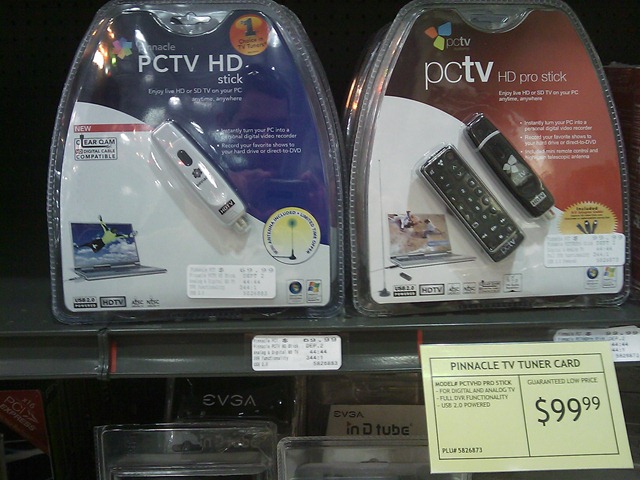 Pinnacle HD Stick ($69.99) / HD Pro Stick ($99.99) – I’ve had good luck with the HD Pro. It also includes a great antenna with a magnetic bottom. These are both USB solutions and very easy to install. I also like the ability for this to tune “Clear QAM,” which means it can tune many HD cable channels, if available in your area.
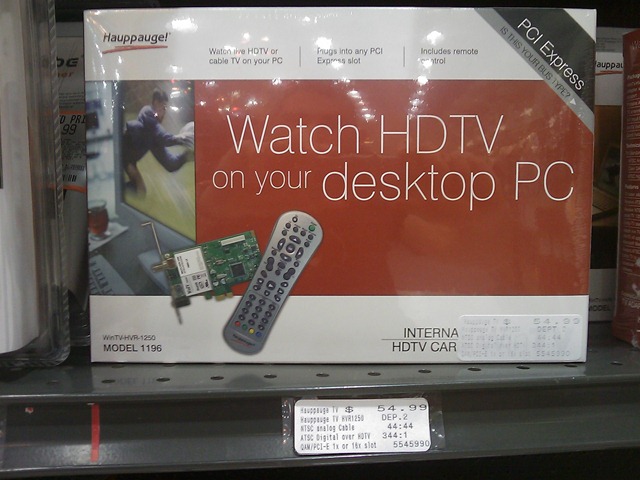 Hauppauge WinTV HVR ($54.99). This is a PCI Express card. Hauppauge also makes excellent WinTV USB-based solutions.
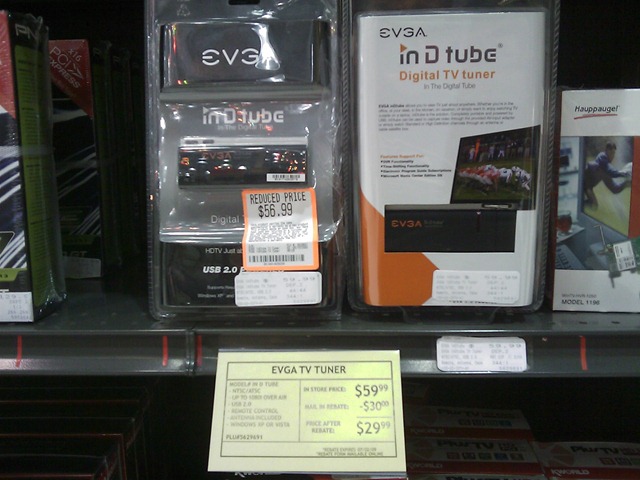 EVGA TV Tuner ($29.99 after rebate) – I haven’t personally tried this tuner, but for about thirty bucks, it’s probably worth trying. Let me know your mileage. I didn’t see a lot of returned units. There was a Plus TV product that seemed to have a lot of returns… I don’t know if that’s because of the driver software being buggy (usually the case), or some other reason.
TIP: Make sure you use the Media Center installer if the TV card you choose has a separate installer for such.
Get an Antenna
If your tuner didn’t come with an antenna, go get one. Your local Radio Shack, Fry’s, and Best Buy will have antennas, often for under $50. Just make sure the connector on your tuner is compatible with the connector that comes with the antenna.
Set up Media Center
Once you’ve installed the hardware drivers, you should be able to launch Media Center and it should detect the new tuner and walk you through a Wizard to scan for channels. I can’t cover each tuner card individually, but I can say the manuals are usually very clear on Media Center configuration.
Ok, you’re all set! A quick trip to Fry’s or Best Buy and 15 minutes of using a wizard, and you can start enjoying your television with Media Center!
 WINDOWS 7: BUT WAIT, THERE’S MORE! Windows 7 sports Internet TV access, too! So, not only will you be able to tune DTV – you’ll be able to get many streaming television channels, Netflix, and more starting this October! Sweet!
More Information
The government has really been pushing the HD transition. You’ve probably seen all those ads on TV. Well, they also have quite a great Web site for helping you find info: www.dtv.gov.
There are also many other great resources online:
- Titan TV – Over-the-air DTV, Cable, and Satellite listings, all in one place, in a TV Guide like format.
- DTV 2009 Converter Box Web Site – For a free coupon to help you save on a TV converter box for your old analog sets, visit this government Web site.
- DTV Answers – A Web site from the National Association of Broadcasters (NAB).
- Windows Media Center Web Site – to learn more about WMC and all of its awesome capabilities.
- Your local TV station Web sites may have a wealth of information about the conversion and their own DTV offerings.
Want me to cover more? Send me an email or post a comment! Enjoy your DTV!
Clubhouse Tags: clubhouse, dtv, digital television, digital tv, hdtv, windows media center, FCC, Titan TV, converter box, NAB, challenge-summer, challenge-windows 7, windows 7, windows vista
Many a developer has been salivating, shorting out keyboards whilst waiting for the Windows Mobile 6.5 developer toolkit to arrive. The new phones are due out starting this month, sporting a slick gesture-friendly interface. The Windows Mobile Marketplace, Microsoft’s answer to the iPhone App Store, is coming within the next 60 days as well, opening an entirely new revenue stream for the millions of Microsoft developers out there.
NOTE: You must have the Windows Mobile 6 SDK. The 6.5 release is actually a “Developer Resource Toolkit", which extends the 6.0 SDK to support the new features.
Ready to get started with Windows Mobile 6.5 development now? Here are the download and info links:
- Windows Mobile 6.0 SDK for Windows Mobile Professional and Classic
- Windows Mobile 6.5 DTK for Windows Mobile Professional and Classic
- Article on Creating Widgets for Windows Mobile 6.5
- Windows Mobile Developer Web Site
- Windows Mobile Marketplace Info Site
- Windows Mobile Marketplace Official Discussion Group
- Windows Mobile Team Blog
- Windows Mobile Team on Twitter
Enjoy!
Best,
-Auri
Clubhouse Tags: clubhouse, windows mobile, 6.5, developer resource kit, sdk, developer, smartphone, visual studio
W00t! After waiting for about 11 days for it to be approved, my first iPhone/iPod app is now available!
Buzzword Baby can be found in the Entertainment category. Here’s a direct link to it in the iTunes App Store.

Here’s the description:
Want to impress your boss? How about using those big shot CEO executive buzzwords, like “didactic activity scenarios” and “cloud-based mobility infrastructure”? Maybe your company needs some wireless fifth generation hardware contingency scenarios?
Well, Buzzword Baby may get you that promotion after all.
Tap “Create Buzz” and Buzzword Baby will give you limitless buzzwords that make sense to executives and marketing personnel. You’ll be laughing – all the way to the bank! Good luck on your next promotion!
Warning: Your personal advancement opportunities may differ.
I actually used this in a client meeting and they said “yeah, I get that WYSIWYG stuff.”
The baby photo is our intern, Doug. He was pretty surprised when he saw his photo in the app. Of course I got permission before I released, and I’m hoping it makes him “famous” 🙂
There’s also a Windows Mobile version, of course 🙂 Ping me if you want it.
Please let me know what you think!
Best,
-Auri
Technorati Tags: iphone app,buzzword generator,Buzzword Baby,99 cents,Auri Rahimzadeh,ipod app,app store,game,entertainment
In Perspective: Windows Mobile Marketplace
Posted: May 19, 2009 in Clubhouse Posts (Computers, Software, and Internet)If you haven’t heard already, Windows Mobile Marketplace is coming out sometime in the next few months. Building upon the craze of an all-inclusive “App Store,” akin to what Apple has had tremendous success with the iPhone and iPod Touch, the Marketplace is going to bring such to Windows Mobile phones. It is quite possible this strategy will be extended to Zune, XBox, and other Microsoft platforms.
While you cannot submit applications at this time, you can sign up for the Marketplace today. This gets you approved for the Marketplace now, meaning you won’t have to wait [hopefully] for account approval when the Marketplace officially starts accepting application submissions.
It’s not surprising that Microsoft has taken many pages from Apple:
- $99 entry fee (same as Apple’s)
- Note this is for the first 5 apps, then $99 per app thereafter (a policy that is subject to change)
- Developers get 70% (so 70 cents of a 99 cent app)
- A developer dashboard (similar to Apple’s)
- Built-in to every Windows Mobile 6.5 phone (Apple’s iTunes App Store is built-in on every iPhone and touch-screen iPod)
- Having the built-in App Store gives way to impulse purchases, especially 99 cent applications
The Windows Mobile Marketplace will be different in many ways as well:
- More devices by many manufacturers expands the breadth of your distribution, and increases potential revenue
- Target devices with capabilities suited to your application’s needs
- Rely on Microsoft as a development company to make development and deployment easy
- Businesses tend to use Windows Mobile, opening up a great market segment to independent developers
- Use Visual Studio to write killer apps in a simple-to-understand framework – .NET
- No reason to code in Objective C (seriously)
There Are Hurdles, Of Course
Now, to be fair, Microsoft faces a few hurdles Apple doesn’t, namely:
- Multiple device types, formats, screen resolutions, processor speeds, keyboard capabilities (Apple only has one format, basically)
- Development time constraints for 12 screen resolutions
- Much less control over what’s already included on phones, and how OEM software will conflict with built-in applications
Hopefully the market will work out the two issues above. I posted a Wish List on the Windows Mobile Marketplace forum, hoping Microsoft will help us developers out when it comes to deployment. To be fair, Microsoft is selling operating system licenses, not phones. The more manufacturers, the more licenses. However, it’s a chicken and egg problem – getting developers to write applications for the devices running the operating system.
There are already tens of thousands of Windows Mobile applications out there. It is likely many of those will already be available in the app store, and they already run on the majority of Windows Mobile devices, especially those with touch screens (the ones I hope will win out in this “format war” of sorts). So, it’s good to see Microsoft can start with a vast library.
Of course, the downside to this is it’s not a new library, and developers may be turned away after seeing so much competition; especially entrenched competition with a potentially unfair lead into inclusion. Microsoft also faces the risk that of those thousands of applications that are already out there, many of them may be written for older Windows Mobile devices, and thus have compatibility issues, or very outdated interfaces. There is something to be said about iPhone apps – they look pretty – with special thanks to Apple’s UIKit extensions, which provide transitions, flips, acrobatics, shine, and panache with practically a click of a button. Let’s hope Microsoft provides the same.
Developers – Make Money!
The draw to these application stores isn’t just for consumers looking for games to show off to friends at a bar. The revenue possibilities for independent and commercial developers are huge. Impulse purchases are a gimme – 99 cents to try an app, just tap to get it. That’s easy money for the store provider, the phone company (they get a cut of that 30%), and especially the developer. Most independent developers could never afford this type of exposure, and commercial distributors are likely salivating over getting their apps in front of so many people through such an outlet. If you’ve read the stories of people making hundreds of thousands of dollars with Apple’s App Store, you can see why.
Microsoft is really the only other game in town when it comes to serious platform availability. Given that they are incredibly popular in the business arena, and business applications are super easy to write with .NET, independent developers should be flocking to their Marketplace. I hope they do – but then again I’m biased as a Windows Mobile developer who’s done WM dev since the beginning.
Can Apple Be Beat?
Apple exudes iron-fisted control over their platform in a way no other provider can, and they can get away with it, since they own both the hardware and the software. Heck, to some extent, they even control the carrier (for now). Microsoft, Google (Android), RIM (Blackberry) – they are all operating system manufacturers with multiple devices on practically every carrier.
It is likely Apple will want to extend the iPhone to other markets. This could mean different-sized screens and device capabilities. If they release a netbook or tablet-like device, they’ll probably want to use the iTunes App Store to monetize it. So, Apple may end up getting dragged into this device format and software compatibility issue as well. Time will tell.
Moving Forward
At the end of the day, though, it’s all about you. If you’re a developer, you win all the way around. For $99, you get distribution to millions of devices, no matter which store you choose. If you have .NET development skills, you can start writing applications for Windows Mobile devices today, and get them distributed easily. Release a great game, entertainment or business application for 99 cents and maybe make thousands of dollars in a single month. The tools are free, and $99 isn’t too bad, especially since you only have to pay it once, not per application. If it doesn’t do well, at least you can brag to your friends that your app is available phones all over the world 🙂
In the mean time, why not sign up for the Marketplace and prepare yourself for a potentially great revenue stream?
Some helpful resources:
Clubhouse Tags: windows mobile, windows mobile marketplace, iphone, ipod, itunes app store, app store, blackberry, rim, clubhouse, developer, compact framework
Updates to article:
- Corrected Android reference
- Updated fee information to include 5 app limit on $99
So I’ve written my new iPhone app and I need a my bank account, routing number, and bank SWIFT number to get paid by Apple. So, how to get the SWIFT number, you ask?
Go to http://www.swift.com/
Enter your bank’s BIC code, if you have it, or you can do a keyword search and find it. All done!
Note: Your bank may not actually have a SWIFT number. Mine sure didn’t. Time to go open a bank account somewhere else – gotta make some green! 🙂
Best,
-Auri
Clubhouse Tags: swift number, iphone development, app store, distributing apps, getting paid, banking
A bit off topic, but… I just noticed you can boldface and underline text in your Facebook chat conversations.
To boldface text, simply wrap it in asterisks, like so:
I am *boldfacing* text
To underline text, simply wrap it in underscore marks, like so:
I am _underlining_ text
You can even combine styles, like boldfaced underlining, by putting
I am *_boldface underlining_* text

The formatting does not appear to work in status updates. Oh well.
Enjoy!
Best,
-Auri
 Auri's Blog