Archive for the ‘AI / Artificial Intelligence’ Category

With the Surface Ultra and Surface RTX Spark announcements at Build, I saw a Microsoft returning to its development and server roots. Finally, the company that brought us IIS, SQL Server, Windows Server, Azure, VS Code, Visual Studio, and more will finally “get serving AI locally on the edge right.” 

Yet the Surface videos and Build announcements gave me pause. For all the pomp and circumstance over the hardware, the software details are scant. Here’s what we see:

  • Windows Subsystem for Linux
  • vLLM
  • VS Code

What here projects any of Microsoft’s strengths?

This is the company that fought tooth and nail to prove they were the best server and desktop operating system combo. The best integrated IT solution for your company. The best hosting for your organization. The go-to software for productivity.

And now they say they’re offering the best solution with what? Linux and AI server software they didn’t write. Heck, they don’t even appear to be loudly committing to contributing to solutions to optimize them for Windows. Remember when they did that after open-sourcing .NET?

I’m hoping this is all a rouse — Microsoft must be working on something they can’t yet announce. Something they’ll announce with the Surface releases this Fall. At least, I hope so. They could finally be the company to “do AI right.” 

For most developers, fumbling around with Ollama and LM Studio and hoping they work at least 90% of the time, is tough. We don’t want to also be IT managers managing vLLM instances. We just want AI to work, 100% of the time. Five 9’s for AI, if you will.

Argue about my being lazy as much as you want — “You just don’t like Linux” or “You just don’t understand”. No — I just want it to run. Easily selecting a model, with an AI server solution I don’t have to think much about. Even supporting an “Auto” mode, choosing the local model I need, and for larger operations, asking if I want to move part or all of my jobs to the Cloud. That’s something Microsoft can do. It’s a strength. 

It could be woven into their other solutions. Native support and understanding of what Local vs. Cloud vs. “Trusted Cloud” for LLM servers from an IT and data privacy management perspective. End-to-end AI support, with local and cloud. 

Because eventually somebody will do this. Because it’s needed. Because the integration of agentic development into the developer workflow will likely never be uncoupled. And there’s an opportunity now for Microsoft to own what they were built for.

Looking forward to the Surface releases to see if I got this one right. ☕
Alright, I’m tired of all the thinking issues with Qwen 3.6. I’ve written about how to fix this for the most part. However, there are certain bugs in llama.cpp and Ollama that may or may not be fixed:

  • llama.cpp doesn’t detect when a connection has been broken, and keeps running until the request completes – that’s silly, since you may have hit “stop” in your harness, but Ollama ignores it.
  • llama.cpp’s API doesn’t have a /stop command or cancellation token.
  • Ollama doesn’t attempt to stop the processing on the llama.cpp side when a connection drops, exacerbating the issue. There was a simple PR to fix this, but the Ollama team nixed it. I’ve asked why but have yet to receive a response.

But do you really need thinking mode? You would think so. But Qwen already reasons deeply. So you may not actually need the thinking commentary. Wait, reasoning and thinking are different? Yes, sir! Asking Copilot to summarize this so I don’t have to type as much 😉

Reasoning in an LLM refers to the model producing token sequences that follow logical or inferential patterns (deduction, induction, stepwise inference) to get from premises to a conclusion, while Thinking usually describes the model emitting intermediate text—notes, chains of thought, or refinements—that make its process visible and let it explore alternative answers; reasoning is the type of structured inference, thinking is the manifestation or workflow (often exposed as step‑by‑step output) used to arrive at or refine those inferences, and neither implies human‑style understanding—both are emergent behaviors of next‑token prediction with tradeoffs in cost, latency, and reliability.

So, unless you need deep thinking with a model that already has high quality reasoning baked-in, you may be able to run with thinking turned off for most operations. This can lead to better performance, faster answers, and an elimination of thinking loops. From what I’ve been reading and experiencing, running with thinking off all the time works well. If you don’t like an answer, point the model in a different direction and let it take it from there. At least in that case, you’re failing quickly.

So, I’ve experimented with this, and the example is below. By simply adding <think></think> to the prompt, it prevents the chain-of-thought tokens (CoT) from being sent to the requestor. From what I’m reading, this doesn’t actually turn off thinking, but eliminates the verbose responses. According to my research, because it’s hard to find a definitive answer:

Putting <think></think> in the modelfile usually only controls whether the model shows its intermediate steps, not whether any internal deliberation occurs; in many LLM implementations “thinking” is just the model emitting extra tokens (a chain‑of‑thought) so closing the tag suppresses that visible trace, but the model may still perform the same hidden activations and context conditioning behind the scenes or use a different decoding path—in other setups the tag can also be a hard signal that disables the extra stepwise generation entirely, so the only reliable way to know is to compare outputs (accuracy, confidence, and latency) with and without the tag.

So here’s the modified prompt part of the modelfile. You can use my online modelfile editor to insert this if you like:

TEMPLATE """
{{ .System }}

<think></think>
{{ .Prompt }}
"""

And you can download my model file here.

And you can install it as follows:

ollama create Qwen3.6NoThink -f QwenNoThink.txt

Caveats:

  • Sometimes it starts thinking again and I don’t know why.
  • Even with thinking disabled, if it starts thinking again, it can get back into its loops. I think this is a bug in Ollama. Hey, it’s only at version 0.30.x (when I wrote this), so it’ll get better. Or something better will be released… Likely also based on llama.cpp for the time being.
  • While I’ve had very good luck with this modelfile, I still find myself restarting Ollama server from time to time. These could be harness bugs as well.

Let me know what you think! Enjoy!

I recently presented on how I get the most out of AI every day… and how you can, too. Enjoy!

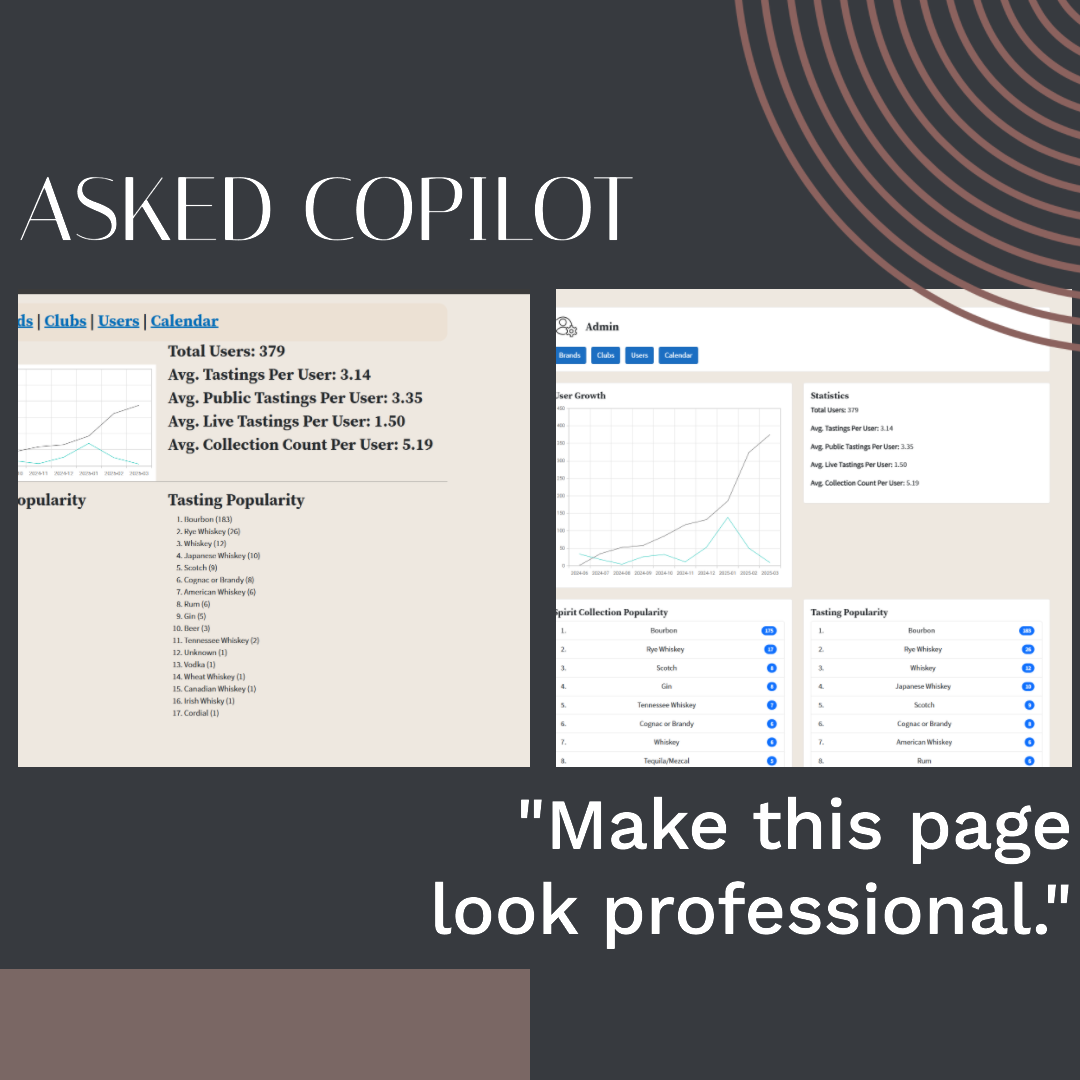
Microsoft Copilot really impressed me with its skills today. I’m not a pro designer by any means. I paid to have Liq designed by a college student, and they did a pretty good job. I was left to do the HTML and CSS – gladly. But I had to add a lot of features to the site this weekend. And they had bare-bones design. So, I wondered… 

What if I prompted Copilot… “Make this page look professional.”

And it did. Check out these Before and Afters.

My admin dashboard:

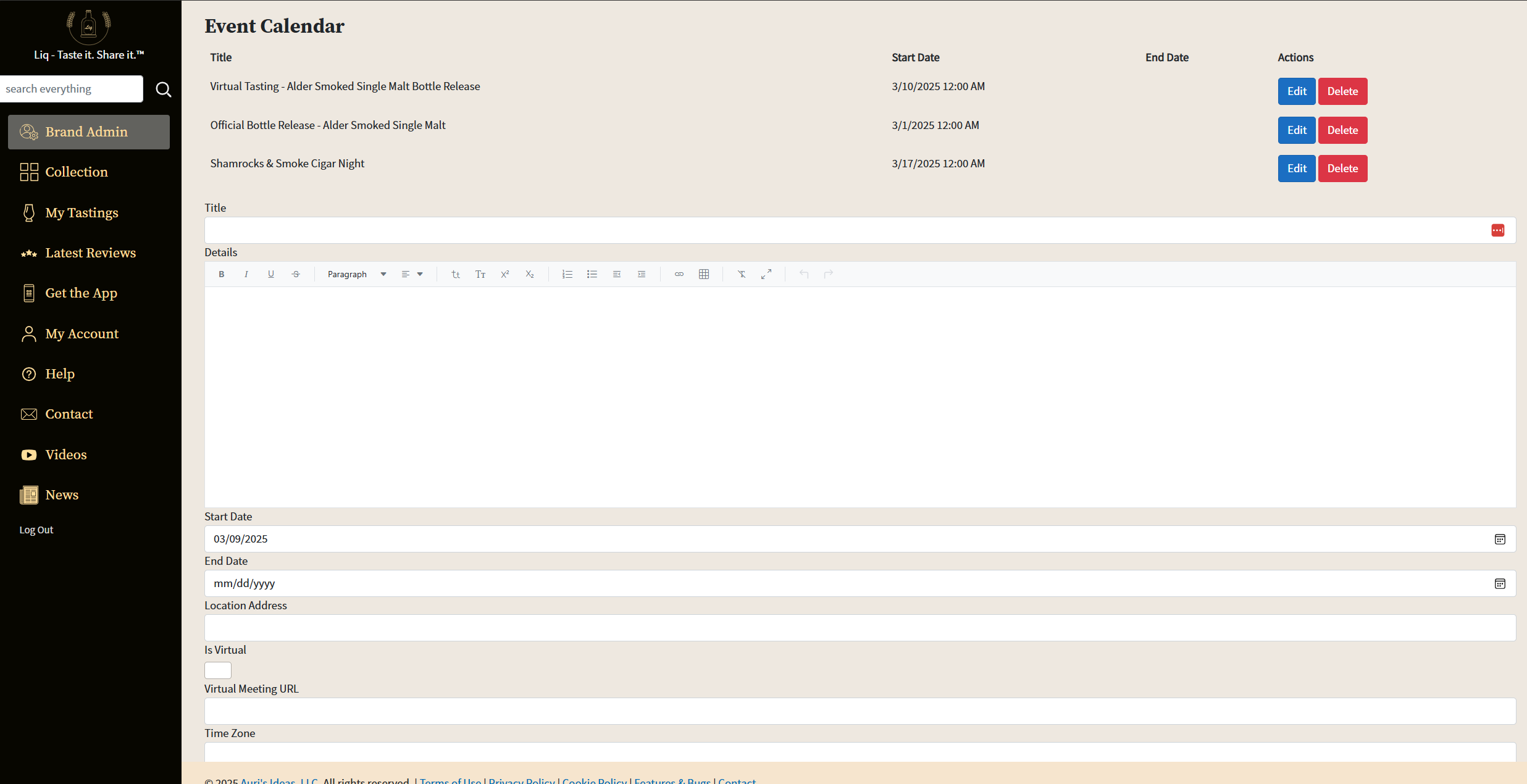
My edit page, which I asked it to split the “create” and “edit” to only be visible when creating/editing.

Before:

After: 

Prompt: “make this page look professional and make sure the Create form is only visible when creating and the Edit form is only visible when editing”

It even explained what it would do! (this is in Visual Studio, btw)

Certainly not a comprehensive redesign. It’s basic Bootstrap. But for quick tune-ups, especially when I’ve just done the bare minimum HTML + CSS, wow. I wonder if I could next try “Make this page look like the other pages” to implement a theme?

Have you tried this? Taken it to the next level? Lemme know…