Ok, as promised, here are the links I shared with you on Career Day:

Microsoft Beginning Programmer Learning Center: http://msdn.microsoft.com/en-us/beginner/default.aspx

Microsoft Dreamspark: https://www.dreamspark.com/

Learning CSS: http://www.w3.org/Style/CSS/learning

Auri Group Web Site: http://aurigroup.com

My Facebook Page: http://facebook.com/aurir

Now Think Now Site: http://www.nowthinknow.com

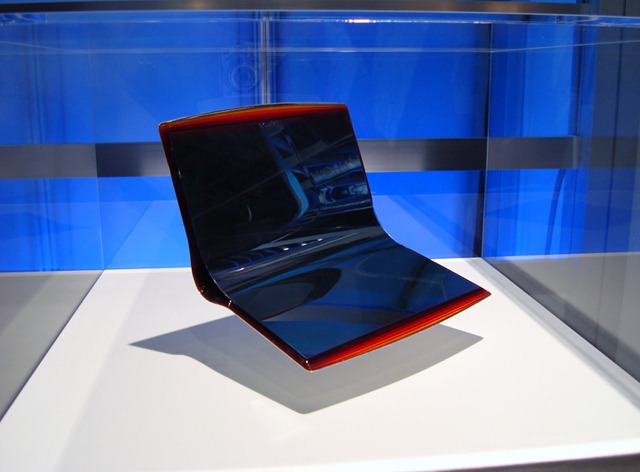
I was in Japan visiting the CEATEC 2009 technology trade show this week and had a chance to visit Intel’s booth. There was an enormous display of netbooks running Windows 7. Now, small computers have never been a rarity in Japan. We just call them netbooks in the U.S., but they’ve had super small systems for years now. Anyway, Intel was showing some very cool designs for netbooks, and I’ve posted them here for you to enjoy 🙂 Some of these will be available Stateside, like the Disney Netbooks. Others may never see the light of day, such as Sony’s OLED flexible notebook concept.

Intel's cool netbook display.

I know people who would want this Acer Aspire One, but wow…

Intel's cool netbook display.

Dynabook with cool design… I’m pretty sure that’s custom paint

Intel's cool netbook display. This is a Disney netbook.

Disney Netbook

Sony's flexible-screen Vaio laptop concept.

Sony’s flexible OLED notebook concept

Intel's Windows 7 display.

Windows 7 display at Intel’s booth

Enjoy!

-Auri

I was in Japan this week for CEATEC 2009. Part of our press tour included visiting Panasonic Center in Tokyo. I took about 147 images and created some photosynths for all to enjoy. Being resource-restricted, Japan often sets the bar for “eco” initiatives, making sure less is more, and that resources are never wasted. For example, just like being polite, recycling is part of the culture; you won’t find a trash can every 10 feet as you do in the United States, but you will find many recycling bins with appropriate slots for plastic, paper, and so forth.

The first room is a garden room, where Panasonic is displaying televisions that use less and less energy, washing machines that detect stains and use only the right amount of water to address them, and more. Many of these technologies are available in Panasonic products available today or this year.

>> View

The second room is applied sciences, and how Panasonic is trying to affect future products and consumer behaviors. For example, an angled washing machine so users don’t have to bend over or fully bend down to load or unload the machine.

>> View

Enjoy!

I’m in Japan this week for the CEATEC trade show, and had a chance to experience Nissan’s Advanced Technology Center in Japan. They showed us a car that detects alcohol in the air, on your breath, and in your sweat, and won’t let you drive until you sober up. The car can also detect inattentive driving or when you’re becoming sleepy, attempt to wake you up or get your attention back on the road, and get you off the road as soon as possible.

Nissan also showed us their Safety Pedal, which detects when you’re coming up to a car too fast and automatically hits the brakes. They called the detection their "magic bumper." Cool.

Video F/X through the ages

Posted: September 26, 2009 in Entertainment

A friend linked me to a video about 100 Years of Video Effects Innovation, inspiring me to upload the videos from the Nimbus DVD Demo disc from 1997 – right from when DVD was introduced to the public. The clips below are from the Rainmaker Digital Studios demo – absolutely fascinating. Part 1 is commercial effects, and Part 2 is movie effects. I’ve also included the 100 Years of Video Effects Innovation video at the end.

Enjoy!

Commercial Video Effects

Movie Effects

100 Years of Video Effects Inspiration

Ouch – $100K fines for garage sale wares. Who knows to what extent it happens, but it’s good to know about this 2008 law.

New Government Policy Imposes Strict Standards on Garage Sales Nationwide

Americans who slap $1 pricetags on their used possessions at garage sales or bazaar events risk being slapped with fines of up to $15 million, thanks to a new government campaign.

The "Resale Round-up," launched by the Consumer Product Safety Commission, enforces new limits on lead in children’s products and makes it illegal to sell any items that don’t meet those limits or have been recalled for any other reason.

The strict standards were set in the 2008 Consumer Product Safety Improvement Act after a series of high-profile recalls of Chinese-made toys.

Read the entire article here.

Well, I’m still baffled why there isn’t a cool Photo Booth app for Windows. Really, I need to find out how to do those filters and release the darn thing.

In the mean time, there is an AWESOME site that does the same thing, and more, right in your Web browser – Cameroid!

Check it out at http://www.cameroid.com.

Yes, it’s free. You don’t even have to login to use it. Nice.

Here are some photos I took using my webcam:

Auri Monkey Auri Matrix Auri Gnome

PING to Windows Live Team: Why not build similar functionality into Windows Live Photo Gallery? Please? 🙂

Aww, Sony, say it isn’t so! MALWARE was the reason? Come on. The people who get p0wned via virtualization malware will likely get p0wned in many other ways as well. So why spend all that time disabling something consumers need to get what they want? For shame.

Now, this should serve as a warning to those buying Windows 7 notebooks, hoping to use the Virtual Windows XP feature. A few things you should know:

  • You must have a version of Windows 7 that supports XP Mode. This would include Professional and Ultimate.
  • You must have a PC with virtualization capabilities. Certain Intel processors have this capability, and all dual-core and greater 64-bit AMD processors already do.
  • You will not need a separate Windows XP license key for XP Mode, at least as far as I can tell based on using the Beta and RC versions of the feature.

ZDNet – Hardware 2.0 – Adrian Kingsley-Hughes – August 11th, 2009

Sony kills virtualization on Vaio notebooks

If you are one of those people who spent close to $2,000 on a shiny Sony Vaio notebook, you should know that your ability to run XP Mode in Windows 7 has been deliberately disabled – by Sony.

While the Intel Core 2 Duo mobile processor that Sony uses inside the Vaio supports VT virtualization, Sony decided that because of the risk of malware, combined with little interest from customers, to disable this feature in the BIOS. To make matters worse, there’s no way for the average user to re-enable VT!

According to Sony senior manager for product marketing Xavier Lauwaert, VT hadn’t been enabled because they had received “very little if any requests until recently” and that engineers were “very concerned that enabling VT would expose our systems to malicious code that could go very deep in the Operating System structure of the PC and completely disable the latter”.

What made matters worse for Sony is that this issue exploded in the comment sections of a blog post on the Windows Team blog site in which Sony was talking up Windows 7.

According to Lauwaert, Sony will “will enable VT on select models” but it seems that Z-series Vaio owners will miss out.

I’ve stopped recommending Sony PCs several years ago. The company seems to focused on consumer electronics and music to product a decent professional-grade computer. This disabling of VT support just reinforces my lack of faith in the company.

Bought a Z-series Vaio and desperately need VT enabled? There is an unofficial patch available. I’ve not tried this, there are warranties and it could cause all sorts of mayhem, but if you¹re stuck, it’s worth a try!

Adrian Kingsley-HughesAdrian is a technology journalist and author who has devoted over a decade to helping users get the most from technology. He also runs a popular blog called The PC Doctor.

What Sony *should* have done was disable it, but make the option to enable it available in the BIOS.

Well, this was funny… if you’ve seen Shatner do Rocket Man, then you’ll enjoy his interpretation of Palin Prose.

My screen broke yesterday. Company was in town and they needed to reach me. Uh-oh, I needed to get my phone fixed, and wipe out my sensitive data before I do. That means I’d also have to go re-sync my phone at the office, lose my text messages and call history, wouldn’t recognize incoming calls, and would basically lose the “state” of my digital life. Or… would I?

Thanks to Microsoft My Phone, a free service that’s in beta right now at http://myphone.microsoft.com, I was able to wipe my phone and have it repaired with no worries. Once I got my phone back, I simply installed My Phone, signed with with my Live ID, and presto – my contacts, calendar entries, text messages, settings and more were transferred to my phone. No computer connection needed. Communications tragedy averted.

Microsoft My Phone