Attention Windows Live Team! You guys are GREAT!!! I love Live Writer, and it’s a bummer there aren’t commercials all over TV saying how awesome all the free software you provide is…

Now that I’ve buttered you up 🙂

Please Add CAPTCHA to Blog Comments on Live Spaces. Seriously. The amount of spam we users get because of automated bots adding comments to our posts… Just insert that Telerik CAPTCHA control or something… quick and easy… just something that prevents our blogs from becoming advertising platforms for Chinese battery manufacturers and the like 🙂

Again, you guys rock. Like my complement sandwich?

Best,

-Auri

image

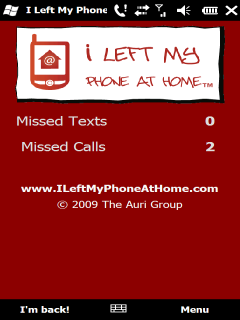
Ever leave your phone at home? It’s no fun to drive back just to make sure you don’t miss that important call, text, appointment…

My company’s latest app, I Left My Phone At Home (www.phonehome.me) is a Windows Phone application that solves this problem!

  • Tracks all missed text messages and phone calls
  • Quickly respond to all your text messages, online!
  • Simple, secure Web site for seeing your missed calls, texts, appointment, and more!
  • See your voicemails and battery life
  • See your next appointment and number of emails
  • No need to drive home to get your phone
  • No service charges – pay once, and that’s it!
  • Free updates!

You can purchase I Left My Phone At Home on Handango or on the Windows Mobile Marketplace.

image

Where is the Windows App Store?

Posted: January 7, 2010 in Uncategorized

With App Stores on mobile phones making software shopping simple and impulsive, why can’t the same be done for Windows PCs and desktops in general?

Look at the facts:

  • There are at least 69 million broadband users in the United States. Downloading games, office software – even annoying farting apps – would be fast and easy.
  • No media distribution means potential for lower prices. No CD or DVD stamping, no need to worry about the next storage format for distribution – just download it to your computer and you’re done.
  • Got a new computer? Need another license? Get it from the App Store.
  • There’s an update available! Download and install it now! How nice would that be? It works on Mobile phones with 500 MHz processors and partially reliable data connections. What about the PC that sits plugged in?
  • Security issues be gone!
  • Software developers have been painfully slow in getting automatic updates out to their consumers. Wouldn’t it be nice if the App Store took care of all this for them?
  • Is this what Apple may eventually do to tie all its products together? Who knows, but good idea…

What do you think?

Comments, please!

-Auri

Windows 7 God Modes

Posted: January 7, 2010 in Uncategorized

If you haven’t heard of Windows 7’s “GodMode” yet, let me give you the scoop: Basically, there are developer “shortcuts” built into Windows 7, and even Vista, that enable easy access to certain settings and information about the operating system. For example, one “GodMode” view displays every setting in Windows in one very organized Window.

In order to access these views, you simply create a folder with a name and a special string after it. So, you don’t have to call the folder “GodMode,” although that does fit the mood the first time you try it out.

NOTE: If you’re not a developer, these may not be that useful to you, but I think the GodMode list of control panels and wizards is really something that should be included with Service Pack 1. It really does make accessing settings easier.

Here’s how you do it:

1. On your desktop – or anywhere, but the desktop is easiest for playing around – create a New Folder.

2. Give the folder a name, then a period, and then one of the following strings:

{00C6D95F-329C-409a-81D7-C46C66EA7F33}
{0142e4d0-fb7a-11dc-ba4a-000ffe7ab428}
{025A5937-A6BE-4686-A844-36FE4BEC8B6D}
{05d7b0f4-2121-4eff-bf6b-ed3f69b894d9}
{1206F5F1-0569-412C-8FEC-3204630DFB70}
{15eae92e-f17a-4431-9f28-805e482dafd4}
{17cd9488-1228-4b2f-88ce-4298e93e0966}
{1D2680C9-0E2A-469d-B787-065558BC7D43}
{1FA9085F-25A2-489B-85D4-86326EEDCD87}
{208D2C60-3AEA-1069-A2D7-08002B30309D}
{20D04FE0-3AEA-1069-A2D8-08002B30309D}
{2227A280-3AEA-1069-A2DE-08002B30309D}
{241D7C96-F8BF-4F85-B01F-E2B043341A4B}
{4026492F-2F69-46B8-B9BF-5654FC07E423}
{62D8ED13-C9D0-4CE8-A914-47DD628FB1B0}
{78F3955E-3B90-4184-BD14-5397C15F1EFC}

And, as a reminder, to create the Godmode folder itself, use this string:

{ED7BA470-8E54-465E-825C-99712043E01C}

So, to create a “GodMode” folder, you would create a new folder and rename it:

GodMode.{ED7BA470-8E54-465E-825C-99712043E01C}

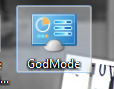
You’ll end up getting a folder like this:

image

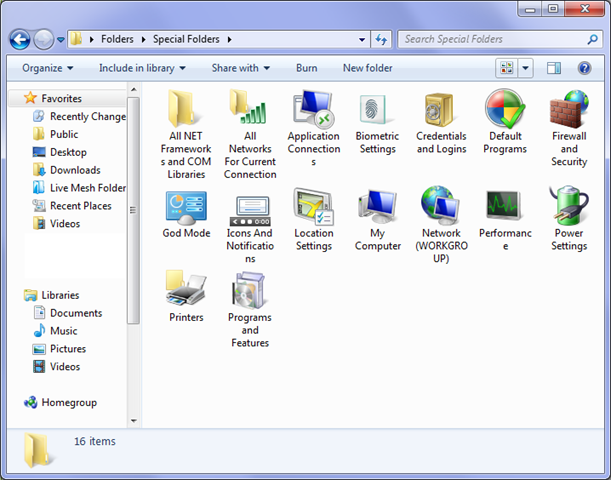
Based on some experimenting with a script I wrote to create them all for me, here’s what I found each does:

God Mode

{ED7BA470-8E54-465E-825C-99712043E01C}

Location Settings

{00C6D95F-329C-409a-81D7-C46C66EA7F33}

Biometric Settings

{0142e4d0-fb7a-11dc-ba4a-000ffe7ab428}

Power Settings

{025A5937-A6BE-4686-A844-36FE4BEC8B6D}

Icons And Notifications

{05d7b0f4-2121-4eff-bf6b-ed3f69b894d9}

Credentials and Logins

{1206F5F1-0569-412C-8FEC-3204630DFB70}

Programs and Features

{15eae92e-f17a-4431-9f28-805e482dafd4}

Default Programs

{17cd9488-1228-4b2f-88ce-4298e93e0966}

All NET Frameworks and COM Libraries

{1D2680C9-0E2A-469d-B787-065558BC7D43}

All Networks For Current Connection

{1FA9085F-25A2-489B-85D4-86326EEDCD87}

Network

{208D2C60-3AEA-1069-A2D7-08002B30309D}

My Computer

{20D04FE0-3AEA-1069-A2D8-08002B30309D}

Printers

{2227A280-3AEA-1069-A2DE-08002B30309D}

Application Connections

{241D7C96-F8BF-4F85-B01F-E2B043341A4B}

Firewall and Security

{4026492F-2F69-46B8-B9BF-5654FC07E423}

Performance

{78F3955E-3B90-4184-BD14-5397C15F1EFC}


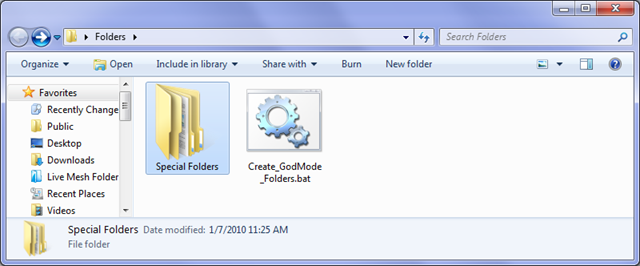
To run my script, simply copy it wherever you want to create these, and it will make a folder called Special Folders and put the new folders in it, as shown below:
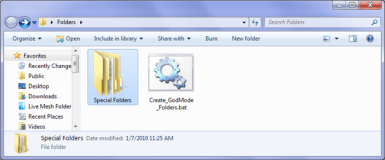
image

After the script runs, this is what’s in the Special Folders folder:
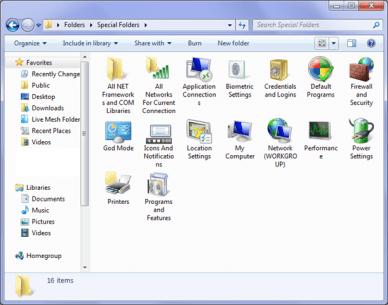
image

In case you don’t want to download my batch file, here is the script for creating all these folders. Feel free to distribute:

mkdir "Special Folders
cd ".\Special Folders
mkdir "God Mode.{ED7BA470-8E54-465E-825C-99712043E01C}
mkdir "Location Settings.{00C6D95F-329C-409a-81D7-C46C66EA7F33}
mkdir "Biometric Settings.{0142e4d0-fb7a-11dc-ba4a-000ffe7ab428}
mkdir "Power Settings.{025A5937-A6BE-4686-A844-36FE4BEC8B6D}
mkdir "Icons And Notifications.{05d7b0f4-2121-4eff-bf6b-ed3f69b894d9}
mkdir "Credentials and Logins.{1206F5F1-0569-412C-8FEC-3204630DFB70}
mkdir "Programs and Features.{15eae92e-f17a-4431-9f28-805e482dafd4}
mkdir "Default Programs.{17cd9488-1228-4b2f-88ce-4298e93e0966}
mkdir "All NET Frameworks and COM Libraries.{1D2680C9-0E2A-469d-B787-065558BC7D43}
mkdir "All Networks For Current Connection.{1FA9085F-25A2-489B-85D4-86326EEDCD87}
mkdir "Network.{208D2C60-3AEA-1069-A2D7-08002B30309D}
mkdir "My Computer.{20D04FE0-3AEA-1069-A2D8-08002B30309D}
mkdir "Printers.{2227A280-3AEA-1069-A2DE-08002B30309D}
mkdir "Application Connections.{241D7C96-F8BF-4F85-B01F-E2B043341A4B}
mkdir "Firewall and Security.{4026492F-2F69-46B8-B9BF-5654FC07E423}
mkdir "Performance.{78F3955E-3B90-4184-BD14-5397C15F1EFC}

NOTE & WARNING: Deleting these folders does NOT affect Windows. It will NOT delete your control panels or settings. Now, what you do with the contents of the folders is done entirely at your own risk!

Easy!

Enjoy!

Thanks to CNET for the list of strings!!!

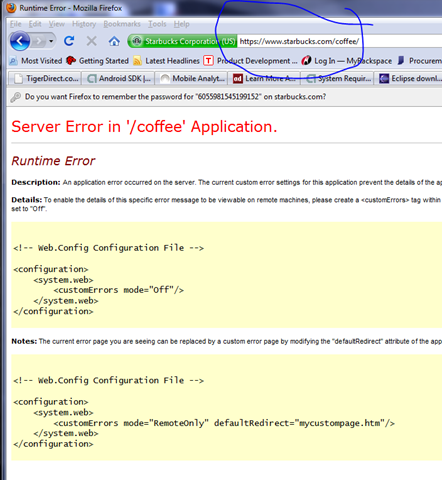
Was trying to learn more about Starbuck’s coffees this morning and whoops, a server error occurred. Now, if they would hire us to fix their site… but then again I’ll bet they have a lot of developers ticked that they have to work on Christmas Eve to fix the error…

image

This, of course, is the reason I have “Whoops” pages on practically every site I build… it’s just a one line change and sure makes the site look better when things go awry…

image

Well, it’s finally happened, my Buzzword Baby software has reached elite status on Windows Mobile Marketplace.

image

Happy Holidays Everyone!

Best,

-Auri

Well, I couldn’t help but share this with everyone… When checking BF Goodrich’s site for info on the Supersport A/S tires I just bought I saw the following amazing benefit:

image 

Mmm… database feature enhancement!

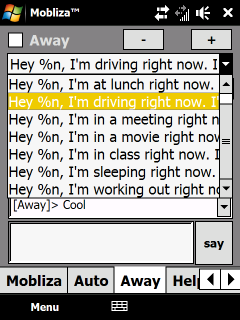
Do you text while you drive? That’s insane! But how will you quell your desire to respond to all those never-ending beeps and bleeps coming from your phone? Well, my latest Windows Mobile app, Mobliza, now available on the Windows Mobile Marketplace, will cure your ills.

Mobliza will automatically respond to your text messages with any text you choose. You can even automatically insert contact names, the current time and date, and create custom messages per contact. You can even set how Mobliza responds to different people!

Bored, and don’t know what to say? A cool feature in Mobliza is her Auto mode. Turn on Auto and Mobliza will actually try to hold a conversation with texters, keeping them busy so you can concentrate on driving, the meeting you’re in, the movie you’re watching, and more.

Mobliza’s now available for $1.99 in the Windows Mobile Marketplace, which you can get for Windows Mobile 6.0, 6.1, and 6.5 phones. The download link is here. I’ve also set up a full support site at http://community.mobliza.com.

Enjoy, Happy Holidays, and Safe Driving!

-Auri

image image

Over the years, consumer electronics have plunged in price yet increased in value. 10 megapixel digital cameras can be had for less than a Franklin, and 1080p high definition camcorders less than $250, sometimes less than $149. With “Black Friday” coming, those deals are only going to be better. Yet today, our adventure only begins with the purchase of these digital media devices.

Affordable Digital Devices are Only the Beginning!

Once you have the device, there a lot of free value added services and software that work with them! Look at YouTube, FlickR, Facebook, MySpace, and Live Spaces. Want to share your video or photos with your family? No need to print or even email them this year – you can use free software to very easily upload those movies and stills to the services of your choosing, even Facebook. With so much competition for online eyeballs, free utilities from companies like Microsoft, Google, and many others have sprung up, giving you incredible power at zero cost.

Take a look at these fine tools to make your holiday media experience even brighter, and yes they will work with slick new Windows 7, Vista, and even old XP:

  • Windows Live Photo Gallery: Transfer photos from your digital camera, organize them in an easy interface, create panoramics just by clicking, upload videos and photos directly to Facebook, YouTube, and even Live Spaces. Simple editing capabilities and photo fixing, like red-eye reduction and automatic photo straightening. You can even tag people in photos.
  • Live Upload for Facebook: A free plug-in for Windows Live Photo Gallery that seamlessly uploads your photos to Facebook. Very well made.
  • Windows Live Movie Maker: Take videos from almost anything and make movies that look great with this easy to use program. Select a bunch of photos and make a slide show. Export it all to DVD, YouTube, and other services.
  • Google Picasa: Powerful and free photo editing and organizing, Picasa has been an amazing free program for photo manipulation for years. Just make sure you want to install any other Google services and applications it wants to put on your system.
  • Microsoft ICE (Image Composite Editor): A more powerful version of the panoramic functionality in Windows Live Photo Gallery, provided to you free by Microsoft Research. Photographers will love the ability for this application to seamlessly stitch images together, and then export them at incredibly high resolutions. No longer is a panoramic lens necessary! (well, basically, let’s be fair :))
  • Microsoft PhotoSynth: Take lots and lots of photos of any environment, and PhotoSynth will create a 360 degree “synth” of the environment. Take a look at the site and see what people just like you have done, it’s amazing. Here are some example synths I made: Example 1 Example 2
  • YouTube: Upload your videos for free and share them with your friends. You can keep prying eyes off your uploads, too, just by making them private.
  • Facebook: Upload your photos and videos for free and share them with your friends on this fantastic social site. You can even tag your friends, and they’ll be notified that they’re in photos you’ve taken, so they can share those photos as well. If you only want friends to see your photos, make sure you only share to the “Friends” group – Friends of Friends still basically opens you up to everybody.

Getting More Value Out of Subscription Services

Subscription services like Netflix have been expanding their “Value Added” free services as of late. Netflix can now stream movies to you almost instantly not only on your PC, but your XBox 360, Playstation 3, and even some BluRay and and Moxi players! All you need is a high-speed Internet connection.

And what about Hulu? Watch your shows anytime you want, but only on your PC? Well, with the $30 program PlayOn, you can stream Netflix, Hulu, and more right to a Playstation 3, and many other devices. It’s the modern times – we no longer cuddle on the couch and see what’s on – we decide what’s to be watched.

Enjoy your digital holidays everyone!

Best,

-Auri
www.aurigroup.com

W00t! After waiting for it to be approved, my first app has been approved for Windows Mobile Marketplace.

Buzzword Baby can be found in the Entertainment category and creates an endless stream of non-repeated buzzwords. Here’s a direct link to it in the Windows Mobile Marketplace.

image

Here’s the description:

Want to impress your boss? How about using those big shot CEO executive buzzwords, like “didactic activity scenarios” and “cloud-based mobility infrastructure”? Maybe your company needs some wireless fifth generation hardware contingency scenarios?

Well, Buzzword Baby may get you that promotion after all.

Tap “Create Buzz” and Buzzword Baby will give you limitless buzzwords that make sense to executives and marketing personnel. You’ll be laughing – all the way to the bank! Good luck on your next promotion!

Warning: Your personal advancement opportunities may differ.

I actually used this in a client meeting and they said “yeah, I get that WYSIWYG stuff.”

As in the iPhone version, the baby photo is our intern, Doug. He was pretty surprised when he saw his photo in the app. Of course I got permission before I released, and I’m hoping it makes him “famous” 🙂

Please let me know what you think!

Best,

-Auri