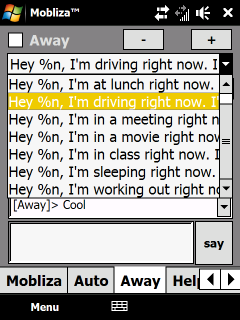
Do you text while you drive? That’s insane! But how will you quell your desire to respond to all those never-ending beeps and bleeps coming from your phone? Well, my latest Windows Mobile app, Mobliza, now available on the Windows Mobile Marketplace, will cure your ills.

Mobliza will automatically respond to your text messages with any text you choose. You can even automatically insert contact names, the current time and date, and create custom messages per contact. You can even set how Mobliza responds to different people!

Bored, and don’t know what to say? A cool feature in Mobliza is her Auto mode. Turn on Auto and Mobliza will actually try to hold a conversation with texters, keeping them busy so you can concentrate on driving, the meeting you’re in, the movie you’re watching, and more.

Mobliza’s now available for $1.99 in the Windows Mobile Marketplace, which you can get for Windows Mobile 6.0, 6.1, and 6.5 phones. The download link is here. I’ve also set up a full support site at http://community.mobliza.com.

Enjoy, Happy Holidays, and Safe Driving!

-Auri

image image

Over the years, consumer electronics have plunged in price yet increased in value. 10 megapixel digital cameras can be had for less than a Franklin, and 1080p high definition camcorders less than $250, sometimes less than $149. With “Black Friday” coming, those deals are only going to be better. Yet today, our adventure only begins with the purchase of these digital media devices.

Affordable Digital Devices are Only the Beginning!

Once you have the device, there a lot of free value added services and software that work with them! Look at YouTube, FlickR, Facebook, MySpace, and Live Spaces. Want to share your video or photos with your family? No need to print or even email them this year – you can use free software to very easily upload those movies and stills to the services of your choosing, even Facebook. With so much competition for online eyeballs, free utilities from companies like Microsoft, Google, and many others have sprung up, giving you incredible power at zero cost.

Take a look at these fine tools to make your holiday media experience even brighter, and yes they will work with slick new Windows 7, Vista, and even old XP:

  • Windows Live Photo Gallery: Transfer photos from your digital camera, organize them in an easy interface, create panoramics just by clicking, upload videos and photos directly to Facebook, YouTube, and even Live Spaces. Simple editing capabilities and photo fixing, like red-eye reduction and automatic photo straightening. You can even tag people in photos.
  • Live Upload for Facebook: A free plug-in for Windows Live Photo Gallery that seamlessly uploads your photos to Facebook. Very well made.
  • Windows Live Movie Maker: Take videos from almost anything and make movies that look great with this easy to use program. Select a bunch of photos and make a slide show. Export it all to DVD, YouTube, and other services.
  • Google Picasa: Powerful and free photo editing and organizing, Picasa has been an amazing free program for photo manipulation for years. Just make sure you want to install any other Google services and applications it wants to put on your system.
  • Microsoft ICE (Image Composite Editor): A more powerful version of the panoramic functionality in Windows Live Photo Gallery, provided to you free by Microsoft Research. Photographers will love the ability for this application to seamlessly stitch images together, and then export them at incredibly high resolutions. No longer is a panoramic lens necessary! (well, basically, let’s be fair :))
  • Microsoft PhotoSynth: Take lots and lots of photos of any environment, and PhotoSynth will create a 360 degree “synth” of the environment. Take a look at the site and see what people just like you have done, it’s amazing. Here are some example synths I made: Example 1 Example 2
  • YouTube: Upload your videos for free and share them with your friends. You can keep prying eyes off your uploads, too, just by making them private.
  • Facebook: Upload your photos and videos for free and share them with your friends on this fantastic social site. You can even tag your friends, and they’ll be notified that they’re in photos you’ve taken, so they can share those photos as well. If you only want friends to see your photos, make sure you only share to the “Friends” group – Friends of Friends still basically opens you up to everybody.

Getting More Value Out of Subscription Services

Subscription services like Netflix have been expanding their “Value Added” free services as of late. Netflix can now stream movies to you almost instantly not only on your PC, but your XBox 360, Playstation 3, and even some BluRay and and Moxi players! All you need is a high-speed Internet connection.

And what about Hulu? Watch your shows anytime you want, but only on your PC? Well, with the $30 program PlayOn, you can stream Netflix, Hulu, and more right to a Playstation 3, and many other devices. It’s the modern times – we no longer cuddle on the couch and see what’s on – we decide what’s to be watched.

Enjoy your digital holidays everyone!

Best,

-Auri
www.aurigroup.com

W00t! After waiting for it to be approved, my first app has been approved for Windows Mobile Marketplace.

Buzzword Baby can be found in the Entertainment category and creates an endless stream of non-repeated buzzwords. Here’s a direct link to it in the Windows Mobile Marketplace.

image

Here’s the description:

Want to impress your boss? How about using those big shot CEO executive buzzwords, like “didactic activity scenarios” and “cloud-based mobility infrastructure”? Maybe your company needs some wireless fifth generation hardware contingency scenarios?

Well, Buzzword Baby may get you that promotion after all.

Tap “Create Buzz” and Buzzword Baby will give you limitless buzzwords that make sense to executives and marketing personnel. You’ll be laughing – all the way to the bank! Good luck on your next promotion!

Warning: Your personal advancement opportunities may differ.

I actually used this in a client meeting and they said “yeah, I get that WYSIWYG stuff.”

As in the iPhone version, the baby photo is our intern, Doug. He was pretty surprised when he saw his photo in the app. Of course I got permission before I released, and I’m hoping it makes him “famous” 🙂

Please let me know what you think!

Best,

-Auri

Ok, as promised, here are the links I shared with you on Career Day:

Microsoft Beginning Programmer Learning Center: http://msdn.microsoft.com/en-us/beginner/default.aspx

Microsoft Dreamspark: https://www.dreamspark.com/

Learning CSS: http://www.w3.org/Style/CSS/learning

Auri Group Web Site: http://aurigroup.com

My Facebook Page: http://facebook.com/aurir

Now Think Now Site: http://www.nowthinknow.com

I was in Japan visiting the CEATEC 2009 technology trade show this week and had a chance to visit Intel’s booth. There was an enormous display of netbooks running Windows 7. Now, small computers have never been a rarity in Japan. We just call them netbooks in the U.S., but they’ve had super small systems for years now. Anyway, Intel was showing some very cool designs for netbooks, and I’ve posted them here for you to enjoy 🙂 Some of these will be available Stateside, like the Disney Netbooks. Others may never see the light of day, such as Sony’s OLED flexible notebook concept.

Intel's cool netbook display.

I know people who would want this Acer Aspire One, but wow…

Intel's cool netbook display.

Dynabook with cool design… I’m pretty sure that’s custom paint

Intel's cool netbook display. This is a Disney netbook.

Disney Netbook

Sony's flexible-screen Vaio laptop concept.

Sony’s flexible OLED notebook concept

Intel's Windows 7 display.

Windows 7 display at Intel’s booth

Enjoy!

-Auri

I was in Japan this week for CEATEC 2009. Part of our press tour included visiting Panasonic Center in Tokyo. I took about 147 images and created some photosynths for all to enjoy. Being resource-restricted, Japan often sets the bar for “eco” initiatives, making sure less is more, and that resources are never wasted. For example, just like being polite, recycling is part of the culture; you won’t find a trash can every 10 feet as you do in the United States, but you will find many recycling bins with appropriate slots for plastic, paper, and so forth.

The first room is a garden room, where Panasonic is displaying televisions that use less and less energy, washing machines that detect stains and use only the right amount of water to address them, and more. Many of these technologies are available in Panasonic products available today or this year.

>> View

The second room is applied sciences, and how Panasonic is trying to affect future products and consumer behaviors. For example, an angled washing machine so users don’t have to bend over or fully bend down to load or unload the machine.

>> View

Enjoy!

I’m in Japan this week for the CEATEC trade show, and had a chance to experience Nissan’s Advanced Technology Center in Japan. They showed us a car that detects alcohol in the air, on your breath, and in your sweat, and won’t let you drive until you sober up. The car can also detect inattentive driving or when you’re becoming sleepy, attempt to wake you up or get your attention back on the road, and get you off the road as soon as possible.

Nissan also showed us their Safety Pedal, which detects when you’re coming up to a car too fast and automatically hits the brakes. They called the detection their "magic bumper." Cool.

Video F/X through the ages

Posted: September 26, 2009 in Entertainment

A friend linked me to a video about 100 Years of Video Effects Innovation, inspiring me to upload the videos from the Nimbus DVD Demo disc from 1997 – right from when DVD was introduced to the public. The clips below are from the Rainmaker Digital Studios demo – absolutely fascinating. Part 1 is commercial effects, and Part 2 is movie effects. I’ve also included the 100 Years of Video Effects Innovation video at the end.

Enjoy!

Commercial Video Effects

Movie Effects

100 Years of Video Effects Inspiration

Ouch – $100K fines for garage sale wares. Who knows to what extent it happens, but it’s good to know about this 2008 law.

New Government Policy Imposes Strict Standards on Garage Sales Nationwide

Americans who slap $1 pricetags on their used possessions at garage sales or bazaar events risk being slapped with fines of up to $15 million, thanks to a new government campaign.

The "Resale Round-up," launched by the Consumer Product Safety Commission, enforces new limits on lead in children’s products and makes it illegal to sell any items that don’t meet those limits or have been recalled for any other reason.

The strict standards were set in the 2008 Consumer Product Safety Improvement Act after a series of high-profile recalls of Chinese-made toys.

Read the entire article here.

Well, I’m still baffled why there isn’t a cool Photo Booth app for Windows. Really, I need to find out how to do those filters and release the darn thing.

In the mean time, there is an AWESOME site that does the same thing, and more, right in your Web browser – Cameroid!

Check it out at http://www.cameroid.com.

Yes, it’s free. You don’t even have to login to use it. Nice.

Here are some photos I took using my webcam:

Auri Monkey Auri Matrix Auri Gnome

PING to Windows Live Team: Why not build similar functionality into Windows Live Photo Gallery? Please? 🙂